Showing posts with label css. Show all posts

Sunday, October 6, 2013

How To setup crawling and indexing for a blogger


hello Guys! After the Long back i am going to share this article with you ,How to determine crawling and indexing portion of the blogger ! this is very sticky question for the newbie how to go through it.

To enable this feature go to Settings | Search Preferences, click Edit next to "Custom robots.txt" and select Yes. After this selection text box will be visible  as image below to give the crawler code for your site.


Now put the below code in your Text-Area :)

User-agent: Mediapartners-Google
Disallow: 

User-agent: *
Disallow: /search
Allow: /
Sitemap: http://www.yourblogname.com/feeds/posts/default?orderby=updated

User-agent: Mediapartners-Google Is A Robot From Google Adsense, Leave It As Is Because If You Mistakenly Change That Than Ads Served by It Will Not Fit With Your Content.


smartvmp|How to setup Indexing and Crawling section of the blog
crawling and indexing


Now You just have to write down above line of code for enabling this superb feature, After Enabling this feature you will find the Search Description and Custom Robots tags in writing New post section as dedicated in Below Image.


Now the other thing is for the

Custom robots header tags.

Just change it as described in the below image and please do it i did it whenever you may be got defeated by google to Get more bucks of visitor .
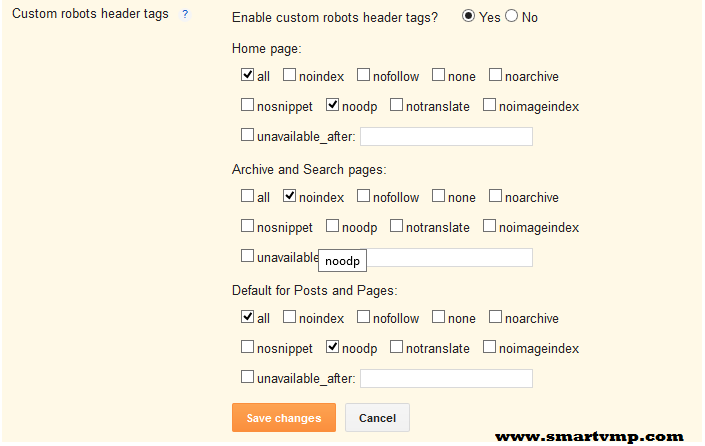

crawling and indexing portiion


Ok now you are sites or blogs going to Crawl by google and many other Bots in somewhat of maximum 15 days 


if you are getting anything wrong from your blog do feel free to contact me on facebook-www.fb.com/smartvmp


Friday, December 14, 2012

HOW TO MAKE GOOGLE SEARCH BAR WITH JAVAsCIPT VALIDATION

YES,NOW YOU ALSO MAKE DR.GOOGLE WITH JavaScript VALIDATION


here i am presenting to you make google custom search with JavaScript and yes its looking awesome with css code,so now you can learn also css very well if any prob then feel free ask me.


required ingredients are:

  1. little HTML gyan (knowledge).
  2. some more css knowledge.
  3. and just cheap java scripting. 
step 1: so here first i past the combination of css 2 and css 3 code for making search bar romantic. past this css after </title> tag. if you are using blogger then make new widget and first past step 3 JavaScript and then css and later step 2 HTML.

<style type="text/css">
<!--start css code-->
.searchform {
 display: inline-block;
 zoom: 1; /* ie7 hack for display:inline-block */
 *display: inline;
 border: solid 1px #d2d2d2;
 padding: 3px 5px;

 -webkit-border-radius: 2em;
 -moz-border-radius: 2em;
 border-radius: 2em;

 -webkit-box-shadow: 0 1px 0px rgba(0,0,0,.1);
 -moz-box-shadow: 0 1px 0px rgba(0,0,0,.1);
 box-shadow: 0 1px 0px rgba(0,0,0,.1);

 background: #f1f;
 background: -webkit-gradient(linear, left top, left bottom, from(#fff), to(#ededed));
 background: -moz-linear-gradient(top,  #fff,  #ededed);
 filter:  progid:DXImageTransform.Microsoft.gradient(startColorstr='#ffffff', endColorstr='#ededed'); /* ie7 */
 -ms-filter:  progid:DXImageTransform.Microsoft.gradient(startColorstr='#ffffff', endColorstr='#ededed'); /* ie8 */
}
.searchform input {
 font: normal 12px/100% Arial, Helvetica, sans-serif;
}
.searchform .searchfield {
 background: #fff;
 padding: 6px 6px 6px 8px;
 width: 202px;
 border: solid 1px #bcbbbb;
 outline: none;

 -webkit-border-radius: 2em;
 -moz-border-radius: 2em;
 border-radius: 2em;

 -moz-box-shadow: inset 0 1px 2px rgba(0,0,0,.2);
 -webkit-box-shadow: inset 0 1px 2px rgba(0,0,0,.2);
 box-shadow: inset 0 1px 2px rgba(0,0,0,.2);
}
.searchform .searchbutton {
 color: #fff;
 border: solid 1px #494949;
 font-size: 11px;
 height: 27px;
 width: 27px;
 text-shadow: 0 1px 1px rgba(0,0,0,.6);

 -webkit-border-radius: 2em;
 -moz-border-radius: 2em;
 border-radius: 2em;

 background: #5f5;
 background: -webkit-gradient(linear, left top, left bottom, from(#9e9e9e), to(#454545));
 background: -moz-linear-gradient(top,  #9e9e9e,  #454545);
 filter:  progid:DXImageTransform.Microsoft.gradient(startColorstr='#9e9e9e', endColorstr='#454545'); /* ie7 */
 -ms-filter:  progid:DXImageTransform.Microsoft.gradient(startColorstr='#9e9e9e', endColorstr='#454545'); /* ie8 */
}

<!----end css code--->
</style>


step 2: ok all set for css now i just type the main part of our search engine Google form.

<form class="searchform" name="search" method="get" action="http://www.google.com/search" onsubmit="return vicky()" target="_blank">
<input type="hidden" name="ie" value="UTF-8"/>
<input type="hidden" name="oe" value="UTF-8"/>
<table border="0">
<img border="0" alt="Google" align="absMiddle" src="https://blogger.googleusercontent.com/img/b/R29vZ2xl/AVvXsEjbMPBPLiH9v2FVHVKDYYXQkjouJwLtHUhGrNzUHzafKR467CY2lPMRMZHqsZockWTKCG1OGMHYwQ3v2_lZ4dDMcI1eJ4nSAa6DfPSukpRlZWDr8sedAi2Ey68tkF48dzEW9OpWg84lAjI/s320/google-new-logo.png"/>&#160;
<input  size="35" maxlength="255" style="width:150px;" name="q" size="70" type="text" class="searchfield" value="google search..." onfocus="if (this.value == 'google search...') {this.value = '';}" onblur="if (this.value == '') {this.value = 'google search...';}" />&#160;
<input type="submit"  class="searchbutton" name="btnG" value="Go"/>
</table>
</form>


yellow text suggest that you can use placeholder="Google search"( but its worst part because its remain unchanged when you clicked on text filed of search box you have to erase that already holder) instead of me.

step 3: now the main validation portion let begun. past this code on before </head>.

<script type="text/javascript">
function vicky()
{
if (document.search.q.value=="Google search...")
{
alert ("Enter search criteria.")
return false
}
}
</script>


google search


i dont thing so I've to write in deep for this script because its very basic if you aren't  know this script then you havent do anything just copy and past i as said and read this all above step very carefully and make attension on where you have to past this text.

 summery:

  • past step 1 css code first if you are user of blogger widget or WordPress,tumbl etc.. if you have you own data site then  past it after</title>.
  • past step 2 in which part you wanna to put Google search bar in your HTML page.
  • past step 3 before your </head> tag end.....//
  • demo is in my blog already .you should  change color and shadow by the implementing in css code(already change code for you become look diff from my site ).

my dear reader if you have any query related to this romantic gadget then feel duty to ask me !!!!!  i will help you 100%. HTML form and JavaScript created by me but 100% css code i founded from via surfing internet and 50% implemented by me.